FTTH vs FTTB: Architecture, Performance & Cost
By Jergeo Engineering Team | Updated August 2026 · 10 min read

Summary
FTTH and FTTB both deliver fiber closer to subscribers, but the endpoint differs. FTTH terminates fiber at each subscriber's ONT inside the home. FTTB terminates at a shared ONU in the building, with copper wiring the last stretch to individual apartments. FTTH wins on bandwidth ceiling, reliability, and 10-year total cost of ownership. FTTB wins on initial deployment cost and speed — especially in buildings with existing copper infrastructure. The choice depends on subscriber density, bandwidth targets, and whether you plan to upgrade later.
Picking between FTTH and FTTB is one of the first decisions in any fiber access project. Both architectures start at the same point — an OLT in the central office sending optical signal over feeder cable. They diverge at the last few hundred meters. That divergence determines the bandwidth ceiling, the maintenance burden, the per-subscriber cost, and how much of your outside plant you can reuse when you eventually upgrade.
We have supplied ODN equipment for both FTTH and FTTB projects across Southeast Asia, the Middle East, and Africa. The projects that ran into problems were not the ones that picked the wrong architecture — they were the ones that picked equipment without thinking about what the next phase would look like. This article breaks down the technical and economic differences so you can make that call with open eyes.
What FTTH and FTTB Actually Mean
FTTH (Fiber to the Home) means the optical fiber runs from the central office through the entire outside plant — feeder cable, distribution cable, drop cable — and terminates at an Optical Network Terminal (ONT) installed inside the subscriber's premises. Every bit of data travels as light from the OLT to the ONT. No copper in the path.
FTTB (Fiber to the Building) means the fiber runs from the central office to a termination point inside or adjacent to the subscriber's building — typically a basement equipment room or a ground-floor cabinet. At that point, an Optical Network Unit (ONU) converts the optical signal back to electrical Ethernet or VDSL. From the ONU to each apartment, signal travels over copper twisted pair or coaxial cable.
The naming convention follows the ITU-T's G-series recommendations for broadband access architectures. The "x" in FTTx marks the boundary where fiber ends and whatever comes next begins.
Architecture Comparison: Where Does the Fiber End?
The network topology is where FTTH and FTTB really diverge. Both start the same way at the headend, but the field infrastructure differs from the distribution point onward.
FTTH network topology
In a typical FTTH deployment, the signal path is:
OLT → Feeder Cable → Fiber Distribution Cabinet (FDC) → Distribution Cable → Fiber Termination Box → Drop Cable → ONT (inside home)
A passive optical splitter inside the FDC (or sometimes in a separate distribution point) splits one feeder fiber into 32 or 64 individual fibers serving separate homes. Each subscriber gets a dedicated optical channel from the OLT. The entire outside plant is passive — no powered equipment between the OLT and the ONT.
FTTB network topology
In FTTB, the topology is shorter:
OLT → Feeder Cable → Fiber Distribution Cabinet (FDC) → Distribution Cable → ONU (in building) → Copper Ethernet → Subscriber (apartment)
The ONU in the building basement is an active device — it needs power, cooling, and rack space. From that ONU, standard Cat5e/Cat6 Ethernet cables run to each apartment through existing building wiring paths. One ONU typically serves 8 to 48 subscribers through an Ethernet switch.
Key structural difference
The critical distinction: in FTTH, the splitter is passive and sits in the field. In FTTB, the ONU is active and sits in the building. This single difference drives everything else — bandwidth, reliability, power requirements, and maintenance patterns. For a deeper look at the passive equipment involved, our ODN equipment guide covers every component type in the fiber access chain.
FTTH vs FTTB: Side-by-Side Comparison
| Parameter | FTTH | FTTB |
|---|---|---|
| Fiber endpoint | Inside each subscriber's home (ONT) | Building equipment room (ONU) |
| Last segment | Optical fiber (drop cable) | Copper (Ethernet or VDSL) |
| Max bandwidth per user | 10 Gbps (XGS-PON) and beyond | 100 Mbps – 1 Gbps (copper-limited) |
| Active field equipment | None (passive outside plant) | ONU + Ethernet switch per building |
| Power requirement | Only at OLT and ONT (both ends) | OLT, ONU (building), and ONT/switch |
| Subscribers per OLT port | Up to 64 (GPON) or 128 (XGS-PON) | 8–48 (limited by ONU switch ports) |
| Maintenance profile | Low — passive plant, few failure points | Higher — active ONU, copper corrosion |
| Typical CAPEX | Higher per subscriber | Lower per subscriber (shared ONU) |
| Upgrade path | Change OLT/ONT electronics only | Replace ONU, run fiber drops, add ONTs |
| Best suited for | Greenfield, high-bandwidth, premium tier | Multi-dwelling units, budget-constrained |
Performance: Bandwidth, Latency, and Reliability
Bandwidth
FTTH wins on bandwidth ceiling, and it is not close. A GPON FTTH connection delivers 2.5 Gbps downstream shared across up to 64 subscribers — and that is the current generation. XGS-PON offers 10 Gbps symmetric. The fiber itself can carry far more; the limit is the electronics at each end.
FTTB is limited by the copper segment. Cat5e Ethernet maxes out at 1 Gbps at 100 meters. Cat6 reaches 10 Gbps but only at 55 meters, and most existing buildings have Cat5e or worse. In practice, FTTB subscribers see 100 Mbps to 1 Gbps — and shared among 8–48 users through the building switch. During peak hours, congestion drops actual throughput well below the rated speed.
Latency
Both architectures deliver low latency compared to DSL or cable — typically under 5 ms from subscriber to OLT. The difference is marginal. FTTH adds one more optical-electrical-optical conversion at the ONT, but the propagation delay difference between fiber and Cat5e copper over 100 meters is less than 0.3 microseconds. For real-world applications — streaming, gaming, video calls — latency is effectively identical.
Reliability
This is where FTTH has a clear operational advantage. The passive outside plant has no powered equipment to fail in the field. Fiber cable does not corrode, is immune to electromagnetic interference, and is not worth stealing (unlike copper). According to the Fiber Optic Association, fiber links in FTTH deployments average fewer service interruptions per year than copper-based last-mile connections.
FTTB introduces two failure-prone elements: the active ONU (which can fail, overheat, or lose power) and the copper inside the building (which corrodes at connectors, degrades with temperature cycling, and occasionally gets stolen). In tropical and humid climates, copper Ethernet connections in building shafts develop corrosion within 3–5 years. We have seen replacement schedules on FTTB projects where copper retermination becomes a recurring maintenance cost that FTTH projects simply do not have.
Cost Analysis: CAPEX vs OPEX
The cost comparison between FTTH and FTTB is where the decision gets nuanced. The answer depends entirely on which cost bucket matters more for your project.
Initial deployment cost (CAPEX)
FTTB is cheaper upfront. One ONU serves 8–48 subscribers through existing copper wiring. You do not need to run fiber drop cables to every apartment, install ONTs inside every unit, or do the in-building fiber routing work. For a 48-apartment building, an FTTB deployment might require 1 fiber cable, 1 ONU, 1 Ethernet switch, and 48 short Ethernet patch cables. FTTH for the same building needs the fiber cable, a fiber termination box, 48 drop cables, 48 ONTs, and the labor to route fiber into each apartment.
On a per-subscriber basis, FTTB CAPEX is typically 40–60% of FTTH CAPEX for multi-dwelling buildings. For single-family homes, the gap narrows because there is no shared copper savings — each house needs its own drop either way.
Operating cost (OPEX)
FTTH costs less to operate. No powered ONU in the field means no electricity bills for building equipment, no cooling, no hardware replacement cycle. Passive splitters and cables last 25+ years with no maintenance. The only active equipment (OLT and ONT) sits at controlled locations with standard power and environmental conditions.
FTTB OPEX adds up: electricity for the ONU and switch, periodic replacement of failed ONU units (typical MTBF is 5–8 years), copper connector maintenance, and troubleshooting the copper segment. For operators with 100,000+ FTTB subscribers, the ONU replacement cycle alone creates a recurring hardware procurement wave every 5–7 years.
10-year total cost of ownership
When you add CAPEX and 10 years of OPEX together, the gap narrows significantly. For greenfield deployments — new buildings, new neighborhoods — FTTH often reaches cost parity with FTTB within 5–7 years because the OPEX savings offset the higher initial spend. For retrofitting existing buildings with good copper infrastructure, FTTB may remain cheaper over the full period.
The break-even calculation depends on three variables: subscriber take rate (higher take rate makes FTTH more attractive because revenue per subscriber is higher), electricity cost in your market, and labor cost for field maintenance.
Where Each Architecture Makes Sense
FTTH is the right choice when:
- You are building a new network from scratch (greenfield) with no existing copper
- Your business plan targets 100 Mbps+ as the base tier
- Subscribers are single-family homes or low-density housing where copper sharing provides little savings
- You want to future-proof for 10 Gbps upgrades without revisiting the outside plant
- Long-term OPEX reduction matters more than short-term CAPEX savings
FTTB is the right choice when:
- You are serving high-density apartment buildings with existing copper Ethernet or telephone wiring
- Initial budget is tight and time-to-market is the priority
- The local market does not yet demand 100+ Mbps speeds as a standard tier
- You plan to upgrade to FTTH in a later phase and want to build the feeder infrastructure now
Upgrading from FTTB to FTTH
Most operators who deploy FTTB treat it as phase one of an eventual FTTH migration. The upgrade path is straightforward if you planned for it from the beginning.
Here is what stays in place: the feeder cables, the Fiber Distribution Cabinet, the distribution cables, and the splice closures. All of the passive ODN infrastructure you installed for FTTB carries over. This is why specifying IP65-rated, high-capacity ODN equipment at the FTTB stage matters — you will use the same hardware for years after the upgrade.
Here is what changes:
- Remove the ONU and Ethernet switch from the building equipment room
- Install a fiber termination box or small fiber distribution box at the building entry point
- Run fiber drop cables from the termination box to each apartment (using existing cable pathways or conduit)
- Install an ONT inside each subscriber's premises
- Reconfigure the OLT software — change from FTTB service profile to FTTH
The cost of this upgrade is primarily the drop cable installation and ONT hardware. The expensive civil works — ducting, feeder cable, cabinet placement — were already done during the FTTB phase. This is the single biggest advantage of starting with FTTB if you are not yet ready to commit to full FTTH.
ODN Equipment in FTTH and FTTB Deployments
Both architectures share most of the passive outside plant equipment. The difference is concentrated at the building entry point and the subscriber endpoint.
Shared equipment in both FTTH and FTTB:
- Optical Distribution Frame (ODF) at the central office — terminates the OLT ports and organizes feeder cable connections
- Fiber Distribution Cabinet (FDC) at the distribution point — houses passive splitters, manages feeder-to-distribution cable transitions, provides IP65 outdoor protection
- Fiber Splice Closure (FSC) — protects fiber splice points in aerial or direct-buried cable routes
- Fiber optic cables — feeder (high-count, 96–576 fibers) and distribution (medium-count, 12–48 fibers)
FTTH-specific equipment:
- Fiber termination boxes at building entry — the transition point from distribution cable to individual drop cables
- Drop cables (1–4 fibers each) from building entry to each subscriber
- ONT (Optical Network Terminal) inside each subscriber's premises
FTTB-specific equipment:
- ONU (Optical Network Unit) in the building equipment room — converts optical to electrical signal
- Ethernet switch — distributes the electrical signal to multiple subscribers
- Copper Ethernet cabling — Cat5e/Cat6 from switch to each subscriber
The fiber termination box plays a key role in FTTH deployments — it is the point where the shared distribution fiber meets the individual drop cables to each subscriber. In FTTB, this box is not needed because the ONU handles the transition electronically.
A fiber patch panel at the central office provides the organized termination and cross-connect point for all OLT-to-FDC connections, regardless of which architecture the field network uses downstream.
Planning an FTTx deployment?
Whether you start with FTTB or go straight to FTTH, the passive ODN infrastructure — cabinets, enclosures, splice closures, and patch panels — carries over between architectures. Specifying quality equipment from the beginning saves money when you upgrade. Talk to our engineering team about your project requirements.
Related Products
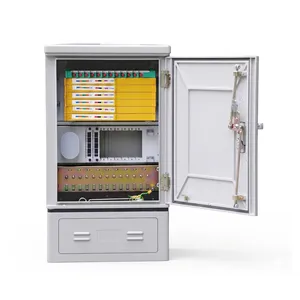
JFDC-72A Fiber Distribution Cabinet
72-port outdoor enclosure for feeder-to-distribution cable transitions
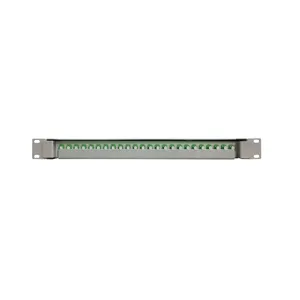
JODF-U3A Fiber Patch Panel
24-port 1U rack-mount patch panel for central office OLT termination
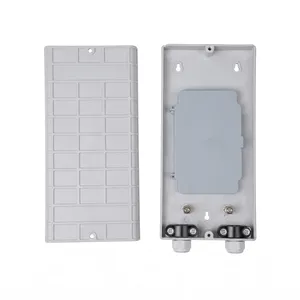
JOTB-24A Fiber Termination Box
24-port outdoor wall-mount termination box for FTTH building entry
Related Articles
FTTH Network Architecture: From OLT to ONT
Complete PON architecture guide: ODN hierarchy, splitter placement, and deployment topologies.
ODN Equipment Guide: Complete Component List
Every piece of passive equipment in a fiber network: FDC, FDB, FSC, OTB, ODF, and splitters.

Outdoor Fiber Termination Box Guide
Capacity, IP rating, material, and connector options for FTTH building entry enclosures.